Focus Distance (New in 1.8)
Focus Distance sets the camera's focus distance and f-stop while you look at the scene. A plane shows where the focus cuts through your objects, and dashed frames show how deep the sharp range is, so you don't need test renders to see what will be in focus.
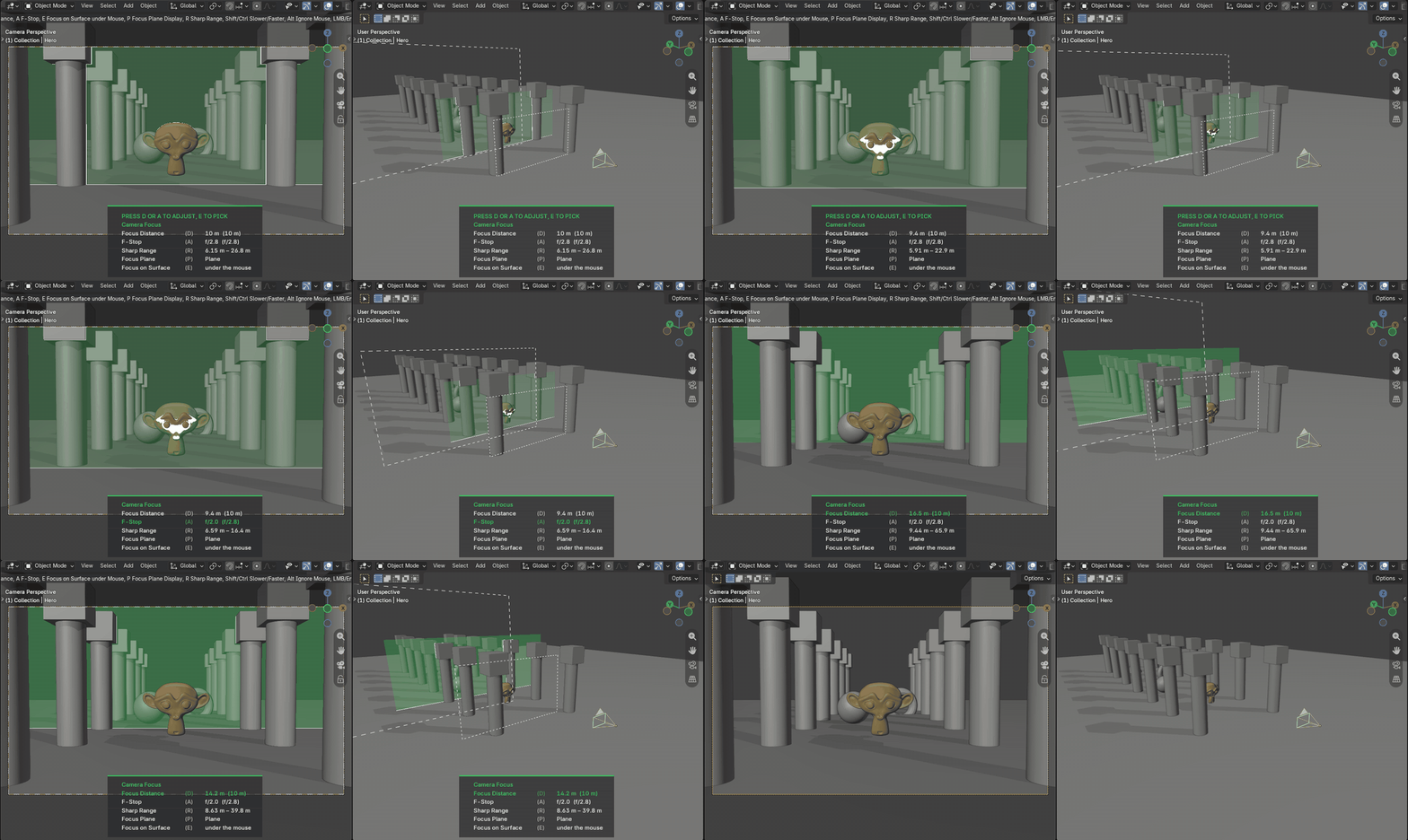
Left: the camera view with the focus plane. Right: the same scene from outside, with the dashed frames of the sharp range.
Start Focus Distance
Start Focus Distance from:
- the Active Camera Pie (Alt + C)
- the camera popover in the 3D Viewport header
- Viewport Tools in the N-Panel
It works on the scene camera and works like the Dolly Zoom: starting it changes nothing yet. You choose a value with its key, then drag the mouse to change it. The overlay in the viewport lists the keys and highlights the active one.
Controls
Press a key once to start changing that value, and press it again to stop.
- D (Focus Distance) Drag the mouse to move the focus closer or further away.
- A (F-Stop) Drag the mouse to change the f-stop. A lower f-stop makes the sharp range shallower.
- E (Focus on Surface) Sets the focus distance to the surface under the mouse.
Guides
- P (Focus Plane) Switches between a see-through plane at the focus distance with a cut line where it meets your objects, only the cut line, and off.
- R (Sharp Range) Shows or hides the dashed frames at the near and far limits of the sharp range.
The sharp range is an estimate, not a render result. It counts a point as sharp when its blur is smaller than 1/1500 of the sensor diagonal, which is the usual convention in photography.
Mouse and Keyboard
- Shift The mouse movement has less effect on the value, for finer adjustments
- Ctrl The mouse movement has more effect on the value, for bigger adjustments
- Alt Hold Alt to ignore the mouse, so you can move it without changing the value
- Middle Mouse / Mouse Wheel Navigate the viewport
- Left Click / Enter Confirm
- Right Click / Esc Cancel and restore the focus distance, f-stop, focus object and depth of field setting
Focus Distance turns on depth of field for the camera.
Note
When the camera focuses on an object (Focus on Object in the camera settings), Blender ignores the focus distance. The overlay then shows the focus object, and pressing D or E clears it so the focus distance is used again.